Introduction to Google Flow
Google Flow is an advanced AI-powered creative platform developed by Google that helps users create cinematic videos, images, and visual stories using artificial intelligence. It is designed for filmmakers, YouTubers, social media creators, digital marketers, and beginners who want to produce professional-looking visual content without depending entirely on traditional filmmaking equipment. With Google Flow, users can transform their creative ideas into videos by providing text prompts, reference images, and video inputs.
The platform combines Google’s advanced generative AI technologies, including Veo, Gemini Omni, and Nano Banana models, to support different creative workflows. Users can generate video clips, edit existing footage, create images, and refine their projects using natural language instructions. Google Flow makes AI-powered filmmaking more accessible by bringing multiple creative tools into one platform.
What Is Google Flow?
Google Flow is an AI filmmaking and creative studio that allows users to create and edit visual content through artificial intelligence. Instead of manually recording every scene, users can describe what they want to create and allow the AI models to generate the required visuals. The platform supports different creative inputs, including text descriptions, images, video clips, and reference materials.
Related Posts
For example, users can describe a cinematic scene featuring a young man walking through a rainy street at night, with colourful neon lights reflecting on the road and dramatic camera movements. Google Flow can interpret the prompt and generate a video based on the instructions. Users can also modify existing video clips, experiment with visual effects, and develop multiple scenes for a complete storytelling project.
How Does Google Flow Work?
Google Flow works through advanced generative artificial intelligence models that understand creative instructions and transform them into visual content. When users enter a prompt or upload reference material, the platform processes the information and generates images or videos based on the selected model and available features.
The workflow generally starts with a creative idea. Users can explain the subject, background, environment, actions, lighting, and camera movements they want in their video. They can also provide reference images to guide the appearance of characters and objects. After generating the content, users can review the results, make adjustments, and create additional scenes. This process allows creators to experiment with different visual styles without recording every scene manually.
Key Features of Google Flow
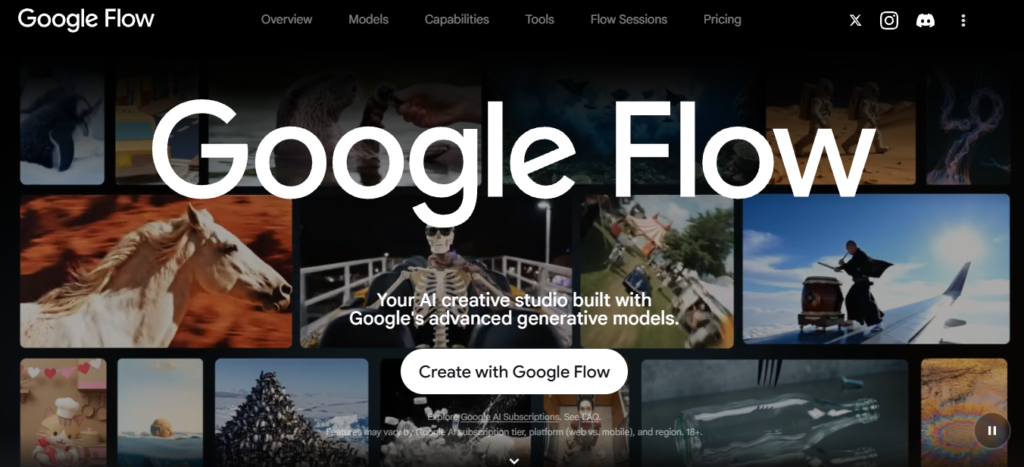
Google Flow provides several AI-powered features that help users create, edit, and organise visual content. Its creative environment combines video generation, image creation, reference-based generation, and natural language editing. Users can explore different AI models depending on their project requirements and available subscription features.
Some important capabilities include Text-to-Video generation, Frames-to-Video creation, Ingredients-to-Video generation, Video-to-Video editing, video extension, image generation, and Scenebuilder. The platform also provides an AI-powered Agent that can assist users with creative planning and editing tasks. These features make Google Flow useful for both simple social media videos and more detailed filmmaking projects.
Text-to-Video Generation
Text-to-Video is one of the most useful features of Google Flow because it allows users to generate video clips using written descriptions. Users do not need to record footage or create complicated animations manually. They can simply describe the scene they want, including the main subject, location, actions, camera angles, lighting, and visual atmosphere.
For example, a user can enter a prompt describing a beautiful cinematic sunset, a young woman walking along a beach, gentle ocean waves, and a slow-motion camera movement. The AI model processes the instructions and generates a video based on the description. This feature is especially useful for YouTube creators, Instagram Reels creators, filmmakers, and digital marketers who want to produce creative video content quickly.
Image-to-Video and Frames-to-Video Generation
Google Flow supports image and frame-based video generation, allowing users to transform static visual references into moving scenes. Users can upload an image and describe the movement they want to see. The AI can then generate a video using the uploaded image as a visual reference.
Frames-to-Video also allows users to guide video generation using starting and ending frames where supported by the selected model. This provides additional creative control over how a scene begins and finishes. For example, users can provide an image of a person standing in front of a building and another image showing the person walking away. The AI can generate a connecting visual sequence based on the selected settings. This feature is useful for creating cinematic animations, visual storytelling, promotional videos, and social media content.
Character Consistency and Reference Images
Character consistency is an important requirement when creating AI-generated films and storytelling videos. If the appearance of a character changes between different scenes, the final video may look unrealistic or disconnected. Google Flow provides Ingredients and References features that allow users to guide video generation using reference images of characters, objects, and environments.
For example, a creator can upload a reference photograph of a fictional character and use it as a visual guide while generating different scenes. The same character can appear in multiple environments, such as a house, garden, city, or mountain location. These references help maintain a more consistent visual appearance across generations, although perfect identity consistency is not guaranteed in every frame.
AI Video Editing with Google Flow
Google Flow is not limited to generating new videos; it also supports editing existing video clips using AI. Users can upload compatible footage and describe the changes they want to make through natural language prompts. Depending on the selected model and supported features, they can modify visual elements, adjust lighting, change the atmosphere, and experiment with different creative effects.
For example, users can upload a daytime video and request a cinematic sunset atmosphere. They can also describe changes such as adding a particular visual effect or modifying the background appearance. The platform can generate an edited version while preserving previous versions in the project’s history. This makes it easier to experiment with creative changes without losing the original footage.
Camera Controls and Cinematic Effects
Google Flow supports filmmaking-style creative instructions that help users develop visually interesting scenes. Users can describe different camera movements, perspectives, and lighting conditions to guide video generation. They can request a close-up shot, wide-angle view, tracking movement, slow camera push, or cinematic aerial-style perspective.
Lighting instructions can also influence the visual atmosphere of a scene. For example, users can request golden-hour sunlight, dramatic shadows, soft studio lighting, rainy weather, or colourful nighttime environments. These instructions help creators develop videos with a particular mood and visual style. The final result depends on the selected model and how accurately it interprets the prompt.
SceneBuilder and Video Scene Management
Scenebuilder is an important feature for users who want to combine multiple AI-generated video clips into a larger visual story. Instead of keeping every generated clip separate, users can arrange them into a sequence according to their storytelling requirements. They can change the order of clips, trim unnecessary portions, preview the complete sequence, and download the finished scene.
For example, a creator developing a short film can generate an introduction scene, a character introduction, an action sequence, and a final scene separately. These clips can then be organised into a connected visual sequence using Scenebuilder. This feature is useful for creating short films, advertisements, trailers, and cinematic storytelling projects.
Google Flow AI Models
Google Flow provides access to different generative AI models for image and video creation. These models have different capabilities, generation limits, and creative controls. Veo 3.1 is designed for high-quality video generation, with capabilities including realistic visuals, physics, prompt adherence, and native audio. Gemini Omni supports video creation and editing using different types of reference inputs, while Nano Banana models focus on image generation and editing.
The choice of model depends on the type of content users want to create. Some models are more suitable for quick video generation, while others provide additional editing and reference-based capabilities. Users should check the available model settings before starting a project because supported features can vary depending on the selected model and subscription.
How to Use Google Flow Step by Step
Getting started with Google Flow is simple for users who have a supported Google Account and meet the platform’s eligibility requirements. Users can access the official website through a compatible browser and begin exploring the available creative tools. The desktop experience provides access to more advanced editing workflows, while mobile access is available in supported locations.
To create a video, users should open the Google Flow website and sign in with their Google Account. After entering the creative workspace, they can start a new project and choose the appropriate video generation model. Next, they need to enter a detailed prompt explaining the scene they want to generate. They can upload reference images or other supported inputs if necessary. After selecting the available video settings, they can generate the clip, review the result, and make additional changes using prompts. Finally, users can organise their clips in Scenebuilder and download the completed sequence.
Google Flow Pricing and Subscription Plans
Google Flow provides different access options depending on the user’s subscription, location, and available features. Users without a Google AI subscription can access eligible basic features with daily credits. Paid Google AI plans provide additional monthly credits and expanded creative capabilities.
The following table gives a general overview of the available plans and their benefits. Pricing and credit allowances can change, so users should verify the latest details on Google’s official website before purchasing a subscription.
| Plan | Main Benefits |
|---|---|
| Free Access | Eligible basic features and daily credits |
| Google AI Plus | Additional monthly credits and expanded features |
| Google AI Pro | Higher monthly credit allowance and advanced capabilities |
| Google AI Ultra | Higher credit limits and access to additional advanced features |
The number of credits required for each generation depends on the selected model, resolution, duration, and generation settings. Users should check the credit cost displayed in Flow before generating videos.
Uses of Google Flow for Content Creators
Google Flow can be useful for different types of digital content creation. YouTube creators can generate cinematic background footage, storytelling scenes, video introductions, and creative promotional content. Instagram creators can produce visually engaging short videos for Reels and other social media platforms.
Digital marketers can experiment with AI-generated advertisements and product presentation videos. Small businesses can use the platform to develop promotional concepts without arranging a traditional video shoot for every scene. Independent filmmakers can also use Google Flow to visualise story ideas, create preliminary scenes, and experiment with different cinematic styles.
Benefits of Google Flow
One of the main benefits of Google Flow is that it makes AI-powered filmmaking more accessible. Users can create visual content without needing professional cameras, expensive production equipment, or advanced animation knowledge. Its different generation methods provide flexibility for users who want to create videos from text, images, frames, or existing footage.
Another important benefit is its ability to support different stages of the creative process. Users can plan ideas, generate visual content, edit existing videos, and organise scenes within the same creative environment. This can reduce the time required for certain production tasks and help creators experiment with new ideas. It is particularly valuable for beginners who want to explore filmmaking and experienced creators who need additional creative tools.
Limitations of Google Flow
Although Google Flow offers advanced AI video creation features, it also has certain limitations. Generated videos may not always follow every instruction accurately. Characters, facial details, clothing, backgrounds, and object movements can sometimes appear inconsistent. Users may need to modify their prompts or generate multiple versions before achieving the desired result.
Video generation also requires credits, and some advanced features may require a paid subscription. Processing time can vary depending on the model and generation settings. Users should also understand that AI-generated footage may require additional editing before it is ready for professional publication. Privacy, copyright, and responsible use of reference images are other important considerations when creating content.
Tips to Get Better Results with Google Flow
Users can improve their video generation results by writing detailed prompts that clearly explain the intended scene. A good prompt should describe the main subject, background, movement, camera perspective, lighting, and overall visual style. Instead of writing only “Create a cinematic video,” users can provide more specific instructions about the environment, actions, and camera movements.
Using suitable reference images can also improve creative consistency. Another useful approach is to generate separate scenes and review each output before combining them into a complete video. Experimenting with different models and generation settings can help users understand which options work best for their projects. Checking credit requirements before generating content is also important for managing available resources.
Google Flow vs Traditional Video Editing Software
Google Flow and traditional video editing applications serve different purposes in the content creation process. Google Flow focuses on generating and modifying visual content through artificial intelligence, while traditional editing software is mainly used to arrange footage, add transitions, mix audio, apply colour corrections, and create finished videos.
| Feature | Google Flow | Traditional Video Editing |
|---|---|---|
| Video Generation | AI-powered | Requires footage or animation |
| Text-to-Video | Available | Not usually built in |
| Image Animation | AI-powered | Requires animation tools |
| Video Editing | AI-assisted | Manual editing controls |
| Camera Effects | Prompt-based generation | Manual effects and keyframes |
| Scene Creation | AI-assisted | Manual arrangement |
| Creative Workflow | AI generation and editing | Editing and post-production |
Both approaches can work together. Creators can generate scenes using Google Flow and then use traditional editing applications to add music, voiceovers, subtitles, sound effects, transitions, and final adjustments.
Future of AI Filmmaking with Google Flow
Artificial intelligence is changing the way visual content is created and edited. Platforms like Google Flow demonstrate how creative ideas can be transformed into cinematic videos using written instructions and visual references. As AI technology continues to improve, video generation is expected to offer more realistic movements, better character consistency, and greater creative control.
These developments may create new opportunities for independent filmmakers, digital artists, content creators, and advertising professionals. Users may be able to experiment with complex visual storytelling without requiring large production teams or expensive equipment. However, human creativity, storytelling, direction, and editing will remain important parts of producing meaningful content.
Website Link
Prompt:
Follow my instruction 👇
Cinematic slow-motion sequence.
[Attached Hero Image preserve 100% face] as a man standing in a crowded, blurred environment with people rushing past him with obscured / masked faces.
He stands still with a serene, content expression, eyes closed, daydreaming.
Suddenly, the camera cuts forward through the crowd into a bright, ethereal, misty dreamscape where [Attached Heroine Image preserve 100% face] stands wearing a vibrant orange ethnic kurta, turning around gracefully with a warm, loving smile.
Cut back to a close-up tracking shot of the man opening his eyes with a gentle, affectionate smile.
Cinematic lighting, shallow depth of field, emotional and romantic atmosphere, 4K resolution, smooth camera transitions.
Conclusion
Google Flow is a powerful AI-powered creative platform that helps users generate videos, create images, edit existing footage, and develop cinematic visual stories. Its integration of Google’s advanced generative AI models provides different creative possibilities for filmmakers, YouTubers, Instagram creators, and digital marketers.
With features such as Text-to-Video, Frames-to-Video, Ingredients-to-Video, AI Video Editing, and Scenebuilder, users can explore modern filmmaking without depending entirely on traditional production methods. Although generation accuracy, credit requirements, and subscription limitations should be considered, Google Flow offers an interesting solution for people who want to experiment with AI-powered content creation.