Introduction to Text To Handwriting
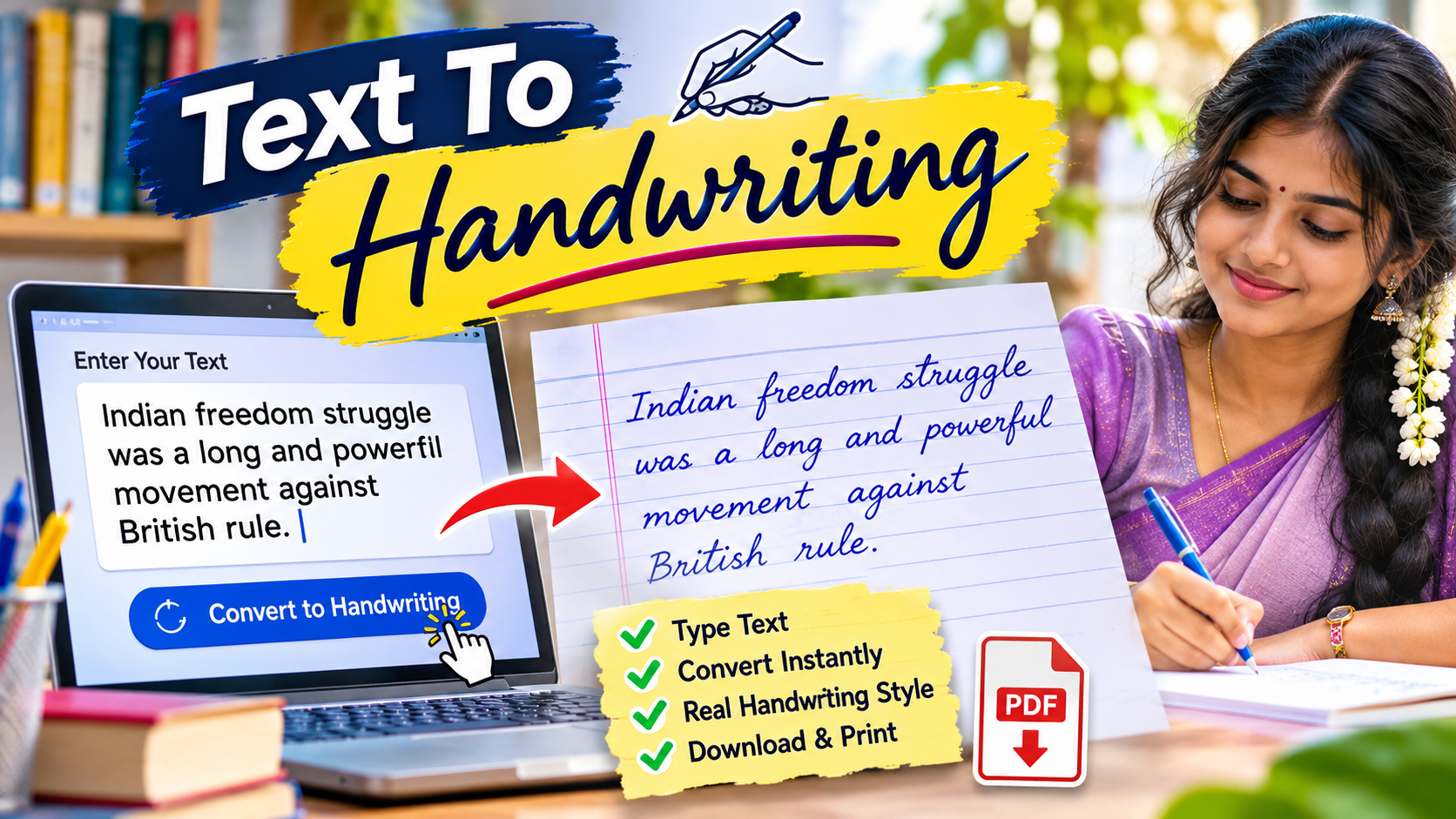
Text To Handwriting is a useful online tool that allows users to convert normal digital text into realistic handwritten content. Instead of manually writing long paragraphs in a notebook, users can simply enter or paste their text into the tool and transform it into a handwriting-style document. This technology is especially helpful for students, teachers, content creators, and people who want to create handwritten-looking notes for personal or educational purposes. The tool uses different handwriting fonts, paper backgrounds, ink colours, and formatting options to make digital text look similar to handwritten content. With a simple and user-friendly interface, Text To Handwriting makes it easier to create attractive handwritten documents without spending hours writing everything manually.
What Is Text To Handwriting?
Text To Handwriting is an online text conversion tool that transforms typed words into handwritten-style images or documents. It uses specially designed handwriting fonts to reproduce the appearance of natural writing on paper. Users can enter their content into a text box, select their preferred handwriting style, and generate a handwritten version within a few seconds. Depending on the platform, users may also be able to customise the paper type, font size, line spacing, text alignment, and ink colour. This makes the tool suitable for creating school notes, study materials, personal letters, creative projects, and handwritten-style presentations. It provides a convenient alternative for people who want the appearance of handwritten text without writing every sentence by hand.
How Does Text To Handwriting Work?
Text To Handwriting works through a simple text-to-image conversion process. First, users enter or paste their required content into the available text editor. The tool then processes the text and applies the selected handwriting font to each character. After choosing the preferred paper background and formatting settings, users can generate the final output. Some advanced tools also provide options to adjust handwriting thickness, ink colour, word spacing, and page margins. The generated content appears as handwritten text on a digital paper background. Users can preview the result and make necessary changes before downloading or saving it. The entire process is designed to be simple, making it accessible even to beginners who have limited technical knowledge.
Related Posts
Easy-to-Use User Interface
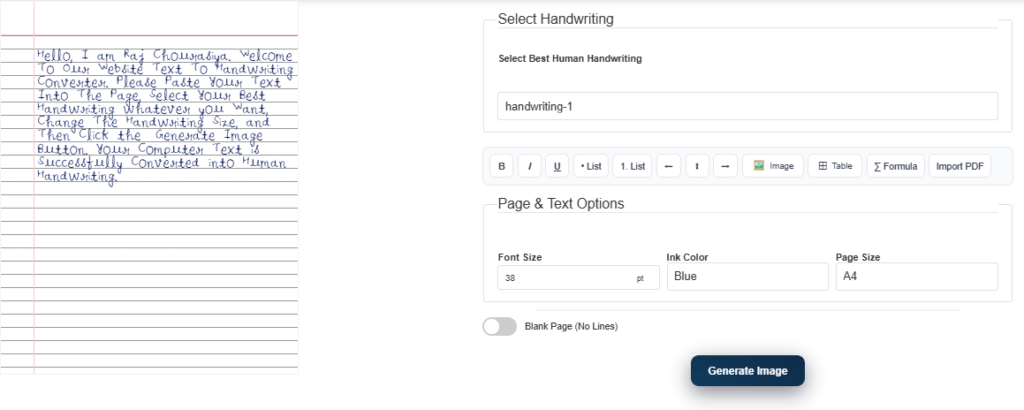
One of the main advantages of Text To Handwriting tools is their simple user interface. Most platforms provide a straightforward text box where users can enter their content without following complicated instructions. The available customisation options are generally displayed clearly, allowing users to select handwriting styles, paper designs, and text formatting settings. Even first-time users can understand the basic functions without requiring special training. A clean interface also helps users complete their work quickly and avoid unnecessary steps. Whether someone wants to convert a short paragraph or prepare multiple pages of notes, an easy-to-use interface makes the overall experience more comfortable and efficient.
Multiple Handwriting Font Styles
Handwriting font selection is one of the most important features of Text To Handwriting tools. Different users have different preferences, so providing multiple handwriting styles helps create more personalised documents. Some fonts look like neat school handwriting, while others resemble cursive writing, casual handwritten notes, or traditional notebook writing. Users can choose a style that matches the purpose of their document. For example, a clean handwriting font may be suitable for educational notes, whereas a decorative style may work better for greeting cards and creative projects. Multiple font options also help users experiment with different appearances and create visually attractive handwritten content.
Customisable Paper Backgrounds
Text To Handwriting tools often provide different paper background options to improve the appearance of generated documents. Users may find plain white paper, ruled notebook paper, graph paper, and other background designs depending on the platform. These backgrounds make the generated content look more like traditional handwritten material. Ruled paper is particularly useful for creating school notes and assignment-style documents, while plain paper may be suitable for letters and creative writing. Some tools also allow users to customise paper colours and page layouts. Choosing an appropriate background can make the final document more organised, readable, and visually appealing.
Text Formatting and Customisation Options
Customisation features allow users to control how their handwritten content appears on the page. Depending on the available tool, users may be able to change font size, text colour, line spacing, margins, and alignment. These settings are important because handwritten documents should maintain proper spacing and readability. If the font size is too small, the content may become difficult to read, while excessive spacing can make the document look unnatural. By adjusting the available formatting options, users can create a balanced handwritten appearance. Some advanced platforms also provide controls for adjusting ink thickness and writing styles, giving users additional flexibility when designing their documents.
Useful for Students and Educational Activities
Students can use Text To Handwriting tools for various educational activities, including preparing revision notes, organising study materials, and creating handwritten-style learning resources. When students have lengthy digital notes, converting selected content into a handwriting-style format can help them produce visually organised study documents. Teachers may also use these tools to prepare educational examples, worksheets, and classroom demonstration materials. However, students should follow their institution’s academic guidelines and avoid presenting digitally generated handwriting as personally handwritten work when manual writing is specifically required. Used responsibly, this technology can support learning activities and make educational content more visually interesting.
Create Handwritten Notes in Less Time
Writing lengthy notes manually can require considerable time and effort. Text To Handwriting tools provide a convenient way to transform existing digital content into handwritten-style notes within a short period. Users can prepare their content in a text editor and convert it into a preferred handwriting format without repeatedly writing the same information. This can be particularly useful when organising personal reference materials, preparing sample notes, or creating supplementary study resources. The time-saving benefit depends on the length of the content and the customisation options available. Although the tool can simplify document preparation, users should still review the generated output to ensure that all text is correctly displayed.
Download and Save Handwritten Documents
After generating handwritten content, many Text To Handwriting platforms provide options to download or save the final result. Depending on the service, users may be able to export their documents as image files or PDF documents. Image formats are useful for sharing handwritten-style content through messaging applications and social media platforms. PDF files are more suitable for storing, printing, and organising multi-page documents. Some platforms may also provide direct printing options. Before downloading, users should check the page layout, text positioning, and overall readability. Saving the final document in an appropriate format makes it easier to access and share whenever required.
Online Accessibility and Device Compatibility
Many Text To Handwriting tools are browser-based, which means users can access them through an internet browser without installing additional software. This makes the technology convenient for people who work with different devices. Users may be able to access these tools through desktop computers, laptops, tablets, and smartphones, depending on the website’s compatibility. A responsive interface helps the text editor and customisation settings adjust to different screen sizes. Browser-based accessibility is particularly useful for users who want to convert text while travelling or working from different locations. However, certain platforms may require an internet connection or provide additional features only through premium subscriptions.
Benefits of Using Text To Handwriting
Text To Handwriting offers several benefits for users who frequently create digital documents. The biggest advantage is convenience, as it reduces the need to manually write every word. Multiple handwriting styles provide creative flexibility, while customisable paper backgrounds help users create different document appearances. The ability to download generated content makes sharing and printing easier. These tools can also support teachers, students, designers, and content creators who need handwritten-style visual materials. Another advantage is that users can edit their original digital text before generating the final document. This helps reduce spelling mistakes and makes content preparation more manageable. Overall, Text To Handwriting combines digital convenience with the visual appearance of traditional handwriting.
Limitations of Text To Handwriting Tools
Although Text To Handwriting tools are useful, they also have certain limitations. Most platforms rely on predefined handwriting fonts, so the generated result may not perfectly reproduce natural human handwriting. Some fonts may look repetitive because the same letters and characters appear in identical forms throughout the document. Certain tools may also have restrictions on text length, download formats, or customisation features. Free versions may include advertisements, watermarks, or limited font collections. Another important limitation is language support, as not every handwriting tool supports regional languages or special characters. Therefore, users should check the available features and test a small amount of text before preparing a large document.
Privacy and Security Considerations
Privacy is an important factor when using online text conversion platforms. Users should understand how a website handles the content entered into its text editor. Some services may process text directly in the browser, while others may send content to their servers for conversion. Before uploading personal letters, confidential documents, or sensitive information, users should review the website’s privacy policy and data-handling practices. It is also advisable to avoid entering passwords, financial information, identification details, or other private data into unknown websites. Choosing a trustworthy platform and using secure browsing practices can help reduce unnecessary privacy risks.
Who Can Use Text To Handwriting?
Text To Handwriting tools are suitable for different categories of users. Students can use them to prepare supplementary study materials, while teachers can create handwritten-style educational examples. Content creators and graphic designers may use these tools to produce attractive visual content for blogs, social media posts, and digital projects. Office professionals can create personalised notes and presentation materials, while individuals can design handwritten-style letters and greeting messages. People who enjoy creative projects can also experiment with different fonts and paper backgrounds. Since most basic tools are easy to understand, users with different levels of technical experience can explore their features.
Tips for Getting Better Handwriting Results
To achieve better results, users should begin with properly formatted and grammatically correct text. Choosing a handwriting font that matches the document’s purpose can improve its overall appearance. It is also important to maintain suitable font sizes, line spacing, and page margins. Users should avoid placing too much text on a single page because overcrowding can reduce readability. Selecting a matching paper background and ink colour can make the output look more natural. Before downloading the final document, preview every page and check for missing characters, incorrect line breaks, and formatting problems. These simple practices can help create clean and professional-looking handwritten-style documents.
Conclusion
Text To Handwriting is a convenient digital solution for converting ordinary typed text into attractive handwritten-style documents. With features such as multiple handwriting fonts, paper background selection, text formatting, and document downloading, it provides users with an easy way to create personalised handwritten content. Students, teachers, professionals, and content creators can use these tools for different educational and creative purposes. Although the generated handwriting may not perfectly match natural human writing, it offers a useful alternative for preparing visual notes and digital documents. By selecting a reliable platform and using its customisation features effectively, users can create readable and visually appealing handwritten-style content in less time.