Introduction to TravelBoast™ My Journey Routes
TravelBoast™ My Journey Routes is a creative travel application designed for people who love travelling, exploring new destinations, and sharing their journey experiences through attractive animated videos. The app allows users to create animated travel route videos by selecting their starting location, destination, and mode of transportation. Instead of simply sharing a normal map screenshot, users can transform their travel routes into engaging animations that visually represent their journey.
Whether you are planning a road trip, travelling by car, riding a motorcycle, taking a flight, or exploring different cities, TravelBoast makes it easy to create personalised travel animations. Users can customise their routes, choose different vehicle icons, adjust animation settings, and export their creations as videos. These videos can be shared on social media platforms such as Instagram, Facebook, WhatsApp, and YouTube.
What is TravelBoast™ My Journey Routes App?
TravelBoast™ My Journey Routes is a travel animation app that helps users visually present their journeys on an animated map. Its main purpose is to convert travel routes into short and entertaining videos. Users can mark their departure point and destination, select a transportation vehicle, and watch an animated vehicle move along the selected route.
Related Posts
The application is especially useful for travel bloggers, content creators, tourists, and social media users who want to share their travel experiences in a creative format. Rather than explaining an entire trip through text, users can create a visual representation that makes the journey easier to understand.
The app also provides customisation options that allow users to create different types of travel animations according to their preferences. Its simple interface makes it accessible to people who do not have professional video editing experience.
Key Features of TravelBoast™ My Journey Routes
TravelBoast offers several useful features for creating animated travel route videos. Users can select different locations, customise vehicles, modify route details, and adjust the appearance of their animations. These features help transform ordinary travel information into attractive visual content.
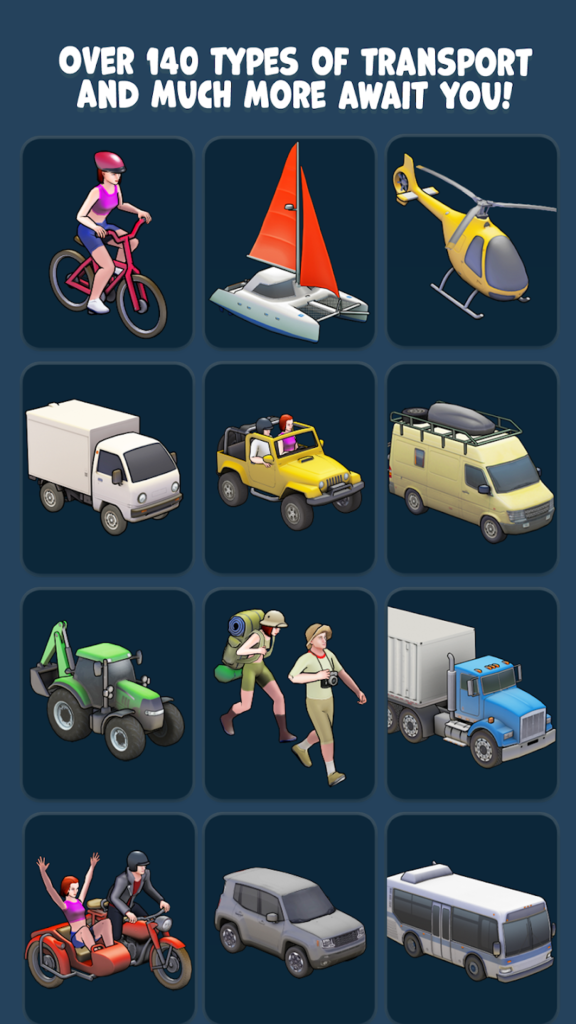
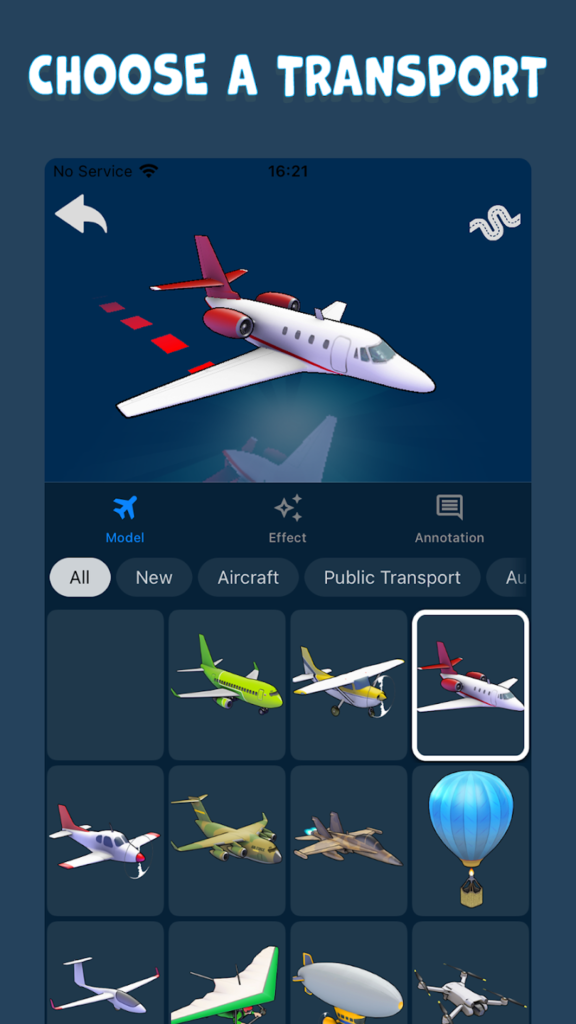
One of the most interesting features is its vehicle selection option. Users can choose from different transportation icons depending on their journey, including cars, motorcycles, buses, aeroplanes, bicycles, and other available vehicles. This makes the animation more realistic and suitable for different travel situations.
The app also allows users to personalise the appearance of their route animations. Depending on the available settings, users can adjust the map presentation, animation speed, and other visual elements to create videos that match their preferred style.
Create Animated Travel Route Videos
The main attraction of TravelBoast is its ability to create animated travel route videos. Users can enter their starting location and destination to build a visual journey on the map. Once the route is prepared, they can select a vehicle and generate an animation showing the vehicle travelling along the route.
For example, if someone travels from Chennai to Bengaluru by car, they can create an animated route video showing the vehicle moving between the two cities. Similarly, users travelling between multiple destinations can represent their entire journey through an animated map.
This feature is particularly helpful for travel vloggers who want to introduce their travel destinations before showing actual travel footage. It also makes travel memories more interesting because viewers can understand the journey’s direction and distance through a simple visual presentation.
Multiple Transportation Options
TravelBoast provides different transportation options to make animated journeys more realistic. Users can select a suitable vehicle according to the type of transportation used during their trip. Available vehicle categories may include cars, motorcycles, buses, trains, aeroplanes, bicycles, boats, and other transport icons.
For example, a user planning a road trip can select a car or motorcycle, while someone sharing an international flight journey can choose an aeroplane. These transportation icons help viewers understand how the journey was completed.
Having multiple transportation choices also gives users creative freedom. They can create different animations for road trips, holiday tours, city explorations, international journeys, and adventure travel experiences. This feature makes the application useful for different types of travel-related content.
Customise Your Travel Routes
Route customisation is another important feature of TravelBoast. Users can personalise their journey by selecting locations and adjusting the route according to their travel plans. This helps them create animations that represent their actual journeys more accurately.
For people travelling through multiple cities, route customisation can be particularly useful. They can organise their journey stops and present the travel path in a clear and attractive format. This is helpful when creating videos about long-distance road trips, weekend holidays, and multi-destination tours.
Customised routes also allow content creators to make their videos more informative. Instead of displaying only a starting point and ending point, they can highlight different locations visited during the journey.
Easy-to-Use Interface
TravelBoast is designed with a user-friendly interface that makes travel animation creation easier. Users do not need advanced editing knowledge or professional video production skills to get started. The app provides accessible controls for selecting locations, choosing vehicles, and creating animated routes.
The simple workflow helps beginners understand how to prepare their travel videos without spending too much time learning complicated editing tools. Users can experiment with different transportation icons, routes, and animation settings to find a suitable presentation style.
This makes TravelBoast a convenient choice for people who want to create travel-related videos quickly. Even users who are new to animation applications can explore its features and develop their own creative travel content.
Useful App for Travel Bloggers and Content Creators
Travel bloggers and social media content creators can use TravelBoast to improve the visual quality of their travel posts. Animated route videos can help introduce destinations, explain travel plans, and show the distance covered during a trip.
For example, a travel blogger can create a short animated video showing a journey from Tamil Nadu to Kerala. The animation can display the route between important locations before the creator shares photographs and videos from the actual trip.
Instagram creators can use these animations in Reels, while YouTube creators can include them in travel vlogs. Facebook users can also share animated journeys with friends and followers. This feature provides an additional creative element for travel content and helps make ordinary journey updates more attractive to viewers.
Share Your Travel Journey on Social Media
Sharing travel experiences is one of the main reasons people create animated route videos. TravelBoast allows users to export their completed animations as video content, depending on the available export options.
After creating a travel animation, users can share it through supported social media and messaging platforms. Instagram, Facebook, WhatsApp, and YouTube are popular platforms where travel route videos can be published.
Short animated journey videos are especially useful for Instagram Stories and Reels because they provide a quick visual introduction to a trip. Users can also combine their TravelBoast animations with photographs, background music, captions, and other video clips using their preferred editing applications. This makes it easier to turn personal travel memories into engaging social media content.
Create Videos for Road Trips and Holidays
Road trips and holiday journeys often involve multiple destinations, interesting locations, and memorable experiences. TravelBoast helps users present these journeys through animated route videos.
For example, someone travelling from Madurai to Kodaikanal can create an animated route showing the journey from the starting point to the destination. Users can also represent longer journeys involving several cities and tourist attractions.
These videos can be used as travel introductions, trip summaries, or personal memory collections. Families, friends, and solo travellers can create different animations to remember their holiday experiences.
The app is also useful for people who enjoy documenting their travel activities. It provides a simple way to represent where a journey started, which locations were covered, and where the trip ended.
Personalise Animation Speed and Appearance
Animation customisation helps users create videos that match their preferred presentation style. Depending on the available app settings, users can modify the movement speed and other visual elements of their travel animations.
For example, a short journey can be presented with a faster animation, while a long-distance trip can use a slower movement to make the route easier to follow. Users can also experiment with different map views and vehicle appearances.
These customisation options are helpful for creating videos suitable for different social media platforms. A simple animation may work well for an Instagram Story, while a more detailed route presentation may be suitable for a YouTube travel vlog.
How to Use TravelBoast™ My Journey Routes App
Using TravelBoast is generally simple, and beginners can follow a straightforward process to create their first animated travel video. First, install the application on a compatible smartphone and open it. Explore the available map and route creation options.
Next, select your starting location and destination. Add additional stops if you want to represent a journey covering multiple places. After selecting the route, choose a suitable transportation vehicle that matches your travel experience.
Once the route and vehicle are selected, customise the animation using the available settings. You can adjust the animation speed and other visual elements according to your preferences. Preview the animation to check whether the route looks correct. Finally, generate or export the completed video using the available export feature. Save the video to your device and share it on your preferred social media platforms.
Benefits of Using TravelBoast
TravelBoast provides several benefits for people who enjoy travelling and creating digital content. Its biggest advantage is that it makes animated travel route creation easier without requiring advanced video editing knowledge.
The app helps users present travel information visually, making it easier for viewers to understand the route between different destinations. It also provides creative transportation icons and customisation options that improve the appearance of travel videos.
Another advantage is its usefulness for social media content creation. Travel creators can use animated maps to introduce destinations, explain road trips, and make their videos more engaging. Personal users can also create animations to preserve their travel memories in a different format. Overall, TravelBoast combines travel route presentation and simple animation features in one application.
Things to Consider Before Using the App
Before using TravelBoast, users should check the application compatibility and available features on their devices. Some features, export options, or customisation tools may differ depending on the app version and subscription plan.
Users should also verify the selected route before exporting a video. Animated route presentations are primarily designed for visual storytelling and should not automatically be treated as real-time navigation instructions.
Depending on the application version, certain advanced features may require in-app purchases or a subscription. Users should review the available pricing information before purchasing any premium features. It is also important to check the app’s privacy policy and permissions before providing personal information or granting access to device features.
Is TravelBoast™ My Journey Routes Worth Using?
TravelBoast is a useful creative application for people who want to present their travel experiences through animated maps. Its route animation concept, transportation selection, and customisation options make it an interesting tool for travel bloggers, vloggers, tourists, and social media creators.
Users who regularly share road trips, holiday experiences, and international travel stories can benefit from its visual storytelling features. It also provides a simple way for beginners to create attractive journey videos without depending entirely on professional video editing software. However, users looking for advanced navigation, live traffic information, or turn-by-turn driving directions should use a dedicated navigation application instead.
Conclusion
TravelBoast™ My Journey Routes is an interesting travel animation application that transforms ordinary travel routes into engaging animated videos. With its vehicle selection, route customisation, animation controls, and video-sharing options, users can create personalised travel stories in a creative format.
Whether you are a travel enthusiast, social media influencer, YouTube creator, or someone who simply loves documenting journeys, TravelBoast can help make your travel experiences more visually attractive. It offers an easy and creative way to show where your journey started, the places you travelled through, and your final destination.